Devices Management | Docs Visionbox
  • Visionbox Digital Signage
  • Products
    Multimedia totems

    A wide range of hardware solutions for your Digital Signage.

    Moai Totem

    Multimedia totems made in Italy.

    Indoor totems

    Top performances, elegant design.

    Outdoor totems

    24/7 visibility and operation, even in extreme weather conditions.

    Pedestal kiosks

    Easy to manage, refined aesthetics, and high durability.

    Monitor

    Full HD, 4K, window-facing, outdoor, or touch? Discover our full range of professional monitors.

    Indoor monitors

    Sharp images, low power consumption, stable operation.

    Showcase monitors

    Perfect readability even in direct sunlight.

    Outdoor monitors

    24/7 visibility and operation, even in extreme weather conditions.

    Monitor touch

    Content interactivity. Maximum engagement.

    Special

    Monitors designed for unique and creative installations.

    Check also

    Refurbished

    Videowall

    Brackets

    Accessories

  • Solutions
    Media Player

    Standalone devices for your content distribution.

    InstantPlay Slide

    Cloud management. Ultra-simple configuration.

    InstantPlay Web

    The Web. Player-ready. Your Digital Signage. Simplified.

    Software CMS

    Manage your content.

    VisionboxOne Free

    Easy to set up. No player needed. Free forever.

    VisionboxOne Plus

    Expand your display network with the same ease as always.

    Full systems

    The complete solution for content management and distribution.

    VisionboxPro

    For display networks in complex multi-site retail and corporate environments.

    Includes

    ProPanel

    ProPlayer

    ProCare

    Modules

    Prices

    Integrations

    Advanced tools for your users.

    Line Manager

    Manage queues easily and quickly.

    Facial recognition

    Targeted content and audience analytics.

    Digital shelf

    Expand your store's display area.

    Density

    Monitor customer traffic in your store.

    Check also

    Monitor

    Multimedia totems

  • Projects
  • Applications
  • Resources
    Documentation

    InstantPlay Docs

    The support portal for configuring and uploading content to your instantPlay.

    VisionboxOne Docs

    The support portal for configuring and using VisionboxOne.

    VisionboxPro Docs

    The support portal to get the most out of VisionboxPro. Discover all the secrets of our system.

    Stay up-to-date

    Blog

    The right place to find tips for your Digital Signage and stay up to date.

    Buying guides

    Out buying guides will help you choose the perfect product.

    Subscribe to our newsletter

    You will receive useful tips, updates, and promotions on Visionbox.it products and services.

    Also check

    Become a reseller

  • About us
      • En
        • It
Visionbox Digital Signage
  • Products
      Multimedia totems
    • Moai Totem
    • Indoor totems
    • Outdoor totems
    • Pedestal kiosks
    • Monitor
    • Indoor monitors
    • Showcase monitors
    • Outdoor monitors
    • Monitor touch
    • Special
    • Check also
    • Refurbished
    • Videowall
    • Brackets
    • Accessories
  • Solutions
      Player
    • InstantPlay Slide
    • InstantPlay Web
    • Software
    • VisionboxOne Free
    • VisionboxOne Plus
    • Full systems
    • VisionboxPro
    • Integrations
    • Line Manager
    • Facial recognition
    • Digital shelf
    • Density
    • Check also
    • Monitor
    • Multimedia totems
    • ProPanel
    • ProPlayer
    • ProCare
    • Modules
    • Prices
  • Projects
  • Applications
  • Resources
      Documentation
    • InstantPlay Docs
    • VisionboxOne Docs
    • VisionboxPro Docs
    • Stay up-to-date
    • Blog
    • Buying guides
    • Subscribe to our newsletter
    • Also check
    • Become a reseller
  • About us
      • En
        • It
    • Quick Start
      • Interface
      • First steps in ProPanel
      • Managing user permissions
      • Glossary
    • File Manager
      • Overview
      • Create a folder
      • Upload video and images
      • Optimize an image
      • Resize, crop, rotate, flip!
      • Use the built-in free image library in File Manager
    • Smart Slider
      • Create a Slider
      • Create an only-images Slider
      • Create a videos-only Slider
      • Compose an empty Slide with the elements
      • Dynamic Slider: all images from a folder!
      • Schedule a single Slide release inside a broadcast
      • Embed a YouTube video
      • Embed a YouTube playlist
      • Create a mixed content Slider with images and videos
      • Randomize image-only Slides
      • Randomize video-only Slides
      • Insert a web page in a Slider using the iframe feature
      • Using Static Overlay in Slider
      • How to use Smart Slider presets
      • Particles Animation
      • Embed a live streaming in a Slider
      • Create a Touch Experience with Smart Slider
    • Modules
      • Schedule and Assign the Module to the Device
      • Configure the Accessibility module
      • Configure Weather Module
      • Configure Time and Date Module
      • Configure Scrolling Text Module
      • Configuring Smart Slider Module
      • Configure Social Feed module
      • Configure Social Reviews module
      • Configuring Google Calendar Module
      • Configuring Google Spreadsheet Module
      • Configuring Google Data Studio Module
      • Charts Module Configuration
      • Configuring Iframe Module
      • View a Google Slide (or PowerPoint) presentation using the iframe module
      • Configuring Radio Module
      • Configuring Facebook Slider Module
      • Configuring YouTube Playlist Module
      • Configure Google Maps Module
      • Configure Power Bi Module
      • Using Fullscreen position
      • List, Calendar and Timeline View
    • Devices
      • Devices Management
      • Devices Status
      • Devices name and preview
      • Manual refresh of Devices
    • Templates
      • Upload a Logo
      • Template selection and customization
      • How to duplicate a template
      • Replacing an old template with a new one
      • Customising a template in the Popolari 2.0 category
      • Customising a template in the Popolari and Popolari 4K category
      • Category Design: customising a template Linea
      • Category Design: customising a Immagine template
      • Category Design: customising a template Cerchi
      • Category Design: customising a template Blocchi
      • Category Design: customising a Gradiente template


      Suggest a change ›
      Report an error ›

    Il portale di Documentazione di supporto all'uso di VisionPanel.

    • Docs
    • Richiedi assistenza
    • En
      • It
    • Quick Start
      • Interface
      • First steps in ProPanel
      • Managing user permissions
      • Glossary
    • File Manager
      • Overview
      • Create a folder
      • Upload video and images
      • Optimize an image
      • Resize, crop, rotate, flip!
      • Use the built-in free image library in File Manager
    • Smart Slider
      • Create a Slider
      • Create an only-images Slider
      • Create a videos-only Slider
      • Compose an empty Slide with the elements
      • Dynamic Slider: all images from a folder!
      • Schedule a single Slide release inside a broadcast
      • Embed a YouTube video
      • Embed a YouTube playlist
      • Create a mixed content Slider with images and videos
      • Randomize image-only Slides
      • Randomize video-only Slides
      • Insert a web page in a Slider using the iframe feature
      • Using Static Overlay in Slider
      • How to use Smart Slider presets
      • Particles Animation
      • Embed a live streaming in a Slider
      • Create a Touch Experience with Smart Slider
    • Modules
      • Schedule and Assign the Module to the Device
      • Configure the Accessibility module
      • Configure Weather Module
      • Configure Time and Date Module
      • Configure Scrolling Text Module
      • Configuring Smart Slider Module
      • Configure Social Feed module
      • Configure Social Reviews module
      • Configuring Google Calendar Module
      • Configuring Google Spreadsheet Module
      • Configuring Google Data Studio Module
      • Charts Module Configuration
      • Configuring Iframe Module
      • View a Google Slide (or PowerPoint) presentation using the iframe module
      • Configuring Radio Module
      • Configuring Facebook Slider Module
      • Configuring YouTube Playlist Module
      • Configure Google Maps Module
      • Configure Power Bi Module
      • Using Fullscreen position
      • List, Calendar and Timeline View
    • Devices
      • Devices Management
      • Devices Status
      • Devices name and preview
      • Manual refresh of Devices
    • Templates
      • Upload a Logo
      • Template selection and customization
      • How to duplicate a template
      • Replacing an old template with a new one
      • Customising a template in the Popolari 2.0 category
      • Customising a template in the Popolari and Popolari 4K category
      • Category Design: customising a template Linea
      • Category Design: customising a Immagine template
      • Category Design: customising a template Cerchi
      • Category Design: customising a template Blocchi
      • Category Design: customising a Gradiente template


      Suggest a change ›
      Report an error ›

    Il portale di Documentazione di supporto all'uso di VisionPanel.

    • Docs
    • Richiedi assistenza
    • En
      • It

    Suggest a change

      Report an error

        Suggest a change

          Report an error

            Devices Management

            Last update: July 2024

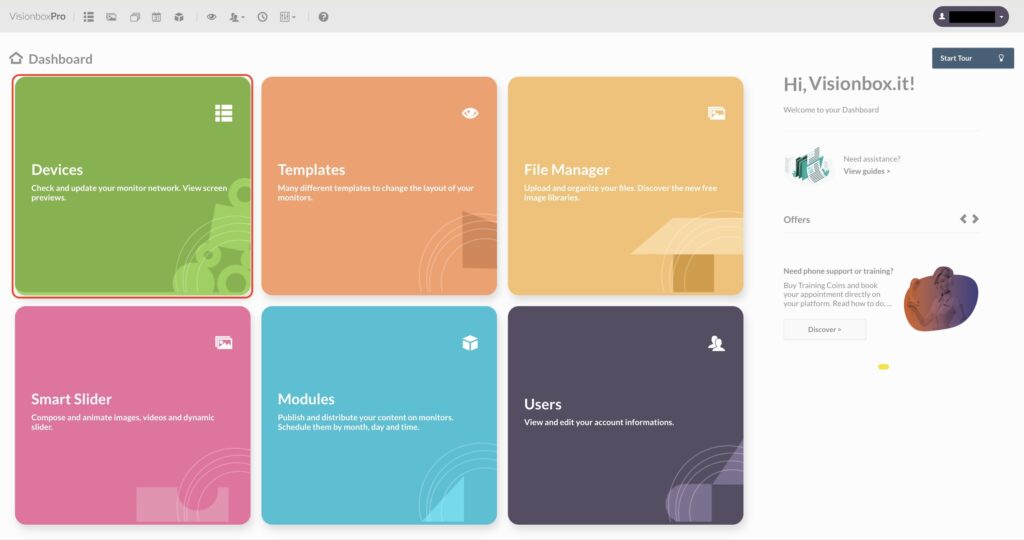
            Click inside the Devices panel.

            Once logged in, you’ll find a list of all the VisionPlayerPro connected to your Monitors.
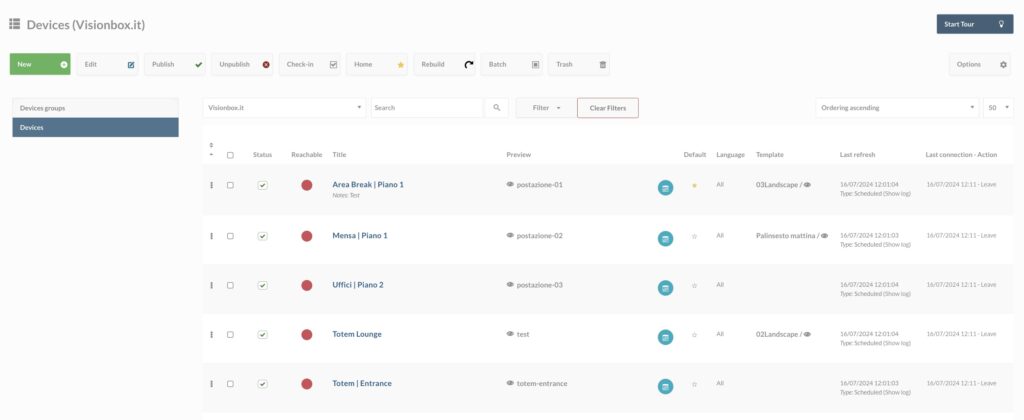
            For each device you can see:

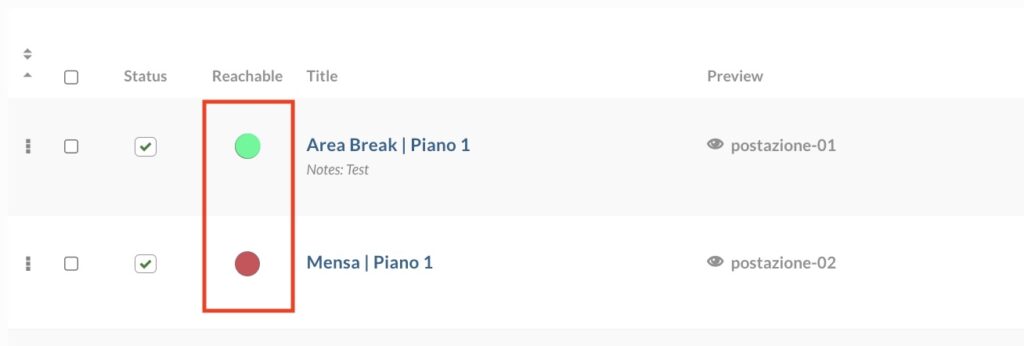
            • The Status
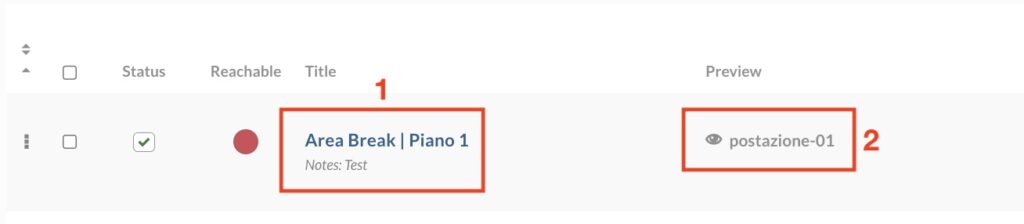
            • The Name (1) and the preview (2)
            • The assigned Template (find out how to choose and customize your Template)

            • The Refresh button.

            Store

            Multimedia totems
            • Moai Totem
            • Indoor totems
            • Outdoor totems
            • Pedestal kiosks
            Monitor
            • Indoor monitors
            • Showcase monitors
            • Outdoor monitors
            • Monitor touch
            • Special
            Check also
            • Refurbished
            • Videowall
            • Brackets
            • Accessories

            Solutions

            Player
            • InstantPlay Slide
            • InstantPlay Web
            Software
            • VisionboxOne Free
            • VisionboxOne Plus
            Full systems
            • VisionboxPro
            Integrations
            • Line Manager
            • Facial recognition
            • Digital shelf
            • Density
            Check also
            • Monitor
            • Multimedia totems

            Resources

            Documentation
            • InstantPlay Docs
            • VisionboxOne Docs
            • VisionboxPro Docs
            Stay up-to-date
            • Blog
            • Buying guides
            • Subscribe to our newsletter
            Also check
            • Become a reseller

            Projects

            Applications

            About us

          • Visionbox.it srl Benefit | Fully paid-up share capital € 30.000 | Italy | P.IVA/Vat n° IT02641190414 | +39 0721 1626262
            Headquarter, Warehouse and Showroom | viale Napoli, 83 | 61121 Pesaro (PU) | visionbox@pec.it

          • I marchi e i loghi di terzi sono di proprietà dei rispettivi proprietari.

            • Privacy policy
            • Cookie Policy

            Support

              This site is registered on wpml.org as a development site. Switch to a production site key to remove this banner.